Core concepts
The following sections provide a more in-depth exploration of the core concepts underlying the toolbox. We delve into the fundamental assumptions and requirements, highlight key considerations to keep in mind, and present general examples to illustrate how to effectively utilize the toolbox in practice.
Datasets
The Congrads toolbox utilizes PyTorch’s Dataset classes, allowing seamless integration with custom data sources. PyTorch’s Dataset class provides a standardized way to represent datasets, making it easy to load, preprocess, and iterate over data efficiently. By implementing custom dataset classes that inherit from torch.utils.data.Dataset, users can define how data is accessed, transformed, and batched. This ensures compatibility with PyTorch’s DataLoader, enabling seamless integration into machine learning pipelines with minimal effort.
We provide some built-in datasets, amongst others Bias Correction and Family Income, both featuring automatic downloading and built-in preprocessing transformations.
These datasets were initially used to evaluate the feasibility of the Constraint-Guided Gradient Descent (CGGD) technique (see the manuscript for details).
from congrads.datasets import FamilyIncome
from congrads.utils import preprocess_FamilyIncome

data = FamilyIncome("./datasets", preprocess_FamilyIncome, download=True)
When using your own dataset, ensure that it extends the PyTorch Dataset class and implements the __len__() and __getitem__() methods.
Alse make sure that the dataset returns data in the form of a dictionary with keys “input” and “target”, representing the input features and target labels, respectively (additional keys are allowed).
The provided function `split_data_loaders` can be used to divide the data into three parts with configurable ratios: for training, validation and testing.
The CongradsCore requires these loaders to function. You can also write your own function to divide the data into loaders.
from congrads.utils import split_data_loaders

loaders = split_data_loaders(
    data,
    loader_args={
        "batch_size": 100,
        "shuffle": True,
        "num_workers": 6,
        "prefetch_factor": 2,
    },
    valid_loader_args={"shuffle": False},
    test_loader_args={"shuffle": False},
)
Networks
You are free to define your own neural network (model) however you want. We only require it to extend the PyTorch torch.nn.Module class and it to output a dictionary structure. The network’s output must have the key “output”. Other layers, such as input or intermediary layers, can be named to your liking. When placing constraints on your network, you will use the layer names and an index to refer to specific neurons in the network.
class Model(nn.Module):
    def __init__(self) -> None:
        super().__init__()
        self.conv1 = nn.Conv2d(1, 20, 5)
        self.conv2 = nn.Conv2d(20, 20, 5)

    def forward(self, x):
        a = F.relu(self.conv1(x))
        b = F.relu(self.conv2(x))
        return {"input": x, "middle": a, "output": b} # Output a dictionary
We also provide a basic Multi-Layer Perceptron (MLP) network using ReLU activations that can be easily configured to match your dataset format.
from congrads.networks import MLPNetwork

network = MLPNetwork(
    n_inputs=6, n_outputs=2, n_hidden_layers=3, hidden_dim=10
)
Descriptor
The descriptor class forms a translation manager that will attach human-readable names to specific points in your neural network. It represents your problem and has the structure of the neural network, while having names that relate to your dataset.
The descriptor introduces the concepts tag and layer. A layer is a section of the network that can be referenced as a whole, such as the input layer, output layer, or any intermediary layer. It always corresponds to a specific dictionary key in the network’s output. A tag is a specific neuron (or multiple) within a layer, which can be referenced using the layer name and an index. Refer to the picture below for a visual representation of these concepts in your model.
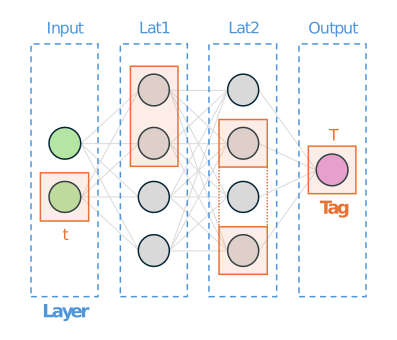
The descriptor.add_layer(key, ...) and descriptor.add_tag(name, layer, index, ...) methods are used to set up this descriptor and prepare it for use.
You must assign a tag to a neuron (or multiple) that you plan to put constraints on so it can be referenced easily.
Note
The neural network receives data in the order it is defined in the dataset. For example, if your dataset has three columns—A (input) and B, C (outputs)—refer to A using index 0 and B, C using indices 0 and 1, respectively.
Certain parts of your network may be non-learnable and should be excluded from the CGGD (Congrads) algorithm.
For example, network inputs are always fixed and cannot be optimized.
To exclude a specific neuron from the learning process, set the layer attribute to `constant=True`.
from congrads.descriptor import Descriptor

descriptor = Descriptor()
descriptor.add_layer("input", constant=True)
descriptor.add_layer("output")
descriptor.add_tag("Date", "input", 0)
descriptor.add_tag("Minimum temperature", "output", 0)
descriptor.add_tag("Maximum temperature", "output", 1)
descriptor.add_tag("Normalized minimum sunshine", "output", 2)
descriptor.add_tag("Normalized maximum sunshine", "output", 3)
Constraints
Constraints are a fundamental part of the Congrads toolbox, allowing you to define relationships between different sections of your dataset—or, in other words, between neurons in your network.
To set up a constraint, the names assigned in the descriptor are used to reference specific data.
The relationship between them is defined using a comparator function, which can be one of PyTorch’s built-in comparison functions (`torch.lt`, `torch.gt`, `torch.le`, `torch.ge`).
Additionally, constraints can accept transformations instead of direct descriptor names. This enables you to apply a function or transformation to the data before evaluating whether the constraint is satisfied. This can be useful to undo an operation that was done in preprocessing for example.
Constraint.descriptor = descriptor
Constraint.device = device
constraints = [
    BinaryConstraint("Minimum temperature", "<=", "Maximum temperature"),
    ScalarConstraint("Normalized minimum sunshine", ">=", 0),
    BinaryConstraint(
        DenormalizeMinMax(
            "Normalized minimum sunshine", min=12, max=32
        ),
        "<=",
        DenormalizeMinMax(
            "Normalized maximum sunshine", min=124, max=324
        ),
    ),
]
The above code translates into the following:
`Minimum temperature`\(\leq\)`Maximum temperature``Normalized minimum sunshine`\(\geq\) 0`Minimum sunshine`\(\leq\)`Maximum sunshine`
Note
Constraints are always placed on data as it is present in the network. If the network outputs normalized predictions, the constraints also have to be formulated as such. A transformation can be used to apply a calculation before processing the constraints, such as a denormalization.
Warning
When placing a constraint between neurons in the network, you must make sure they can be compared sensibly. For example, you cannot directly compare two neurons that were normalized differently (e.g. with a different min/max range). You can use a transformation to first denormalize each neuron, to then make the comparison on original data.
It is possible to implement your own custom constraints to allow for additional complexity in your network.
A new constraint must extend the base `Constraint` class and implement the check_constraint(...) calculate_direction(...) methods.
Please refer to the built in constraints for examples how to achieve this.
MetricManager
To be able to track the Constraint Satisfaction Ratio (CSR), a score between 0 and 1 that indicates how well the constraint is satisfied, the MetricManager
All metric values can be calculated and retrieved using metric_manager.aggregate(group), after which they can be logged to TensorBoard, a CSV file or other storage methods using the hooks, such as the example below.
Metrics having group “during_training” will update every epoch, having group “after_training” are calculated only when the training is finished.
The metric_manager.reset(group) method will reset the metric for a specific group so that new values can be stored for a next iteration.
from torch.utils.tensorboard import SummaryWriter
from congrads.metrics import MetricManager
from congrads.utils import CSVLogger

# Initialize metric manager
metric_manager = MetricManager()

# Initialize data loggers
tensorboard_logger = SummaryWriter(log_dir="logs/FamilyIncome")
csv_logger = CSVLogger("logs/FamilyIncome.csv")

def on_epoch_end(epoch: int):
    # Log metric values to TensorBoard and CSV file
    for name, value in metric_manager.aggregate("during_training").items():
        tensorboard_logger.add_scalar(name, value.item(), epoch)
        csv_logger.add_value(name, value.item(), epoch)

    # Write changes to disk
    tensorboard_logger.flush()
    csv_logger.save()

    # Reset metric manager
    metric_manager.reset("during_training")
CongradsCore
The `CongradsCore` integrates all the previously discussed concepts, along with additional configuration settings such as the loss function, optimizer, dataloaders, network architecture, and more.
It brings together these elements to form a cohesive framework that ensures smooth execution of the Congrads algorithm, guiding the neural network’s training process while adhering to constraints and other user-defined parameters.
core = CongradsCore(
    descriptor=descriptor,
    constraints=constraints,
    dataloader_train=loaders[0],
    dataloader_valid=loaders[1],
    dataloader_test=loaders[2],
    network=network,
    criterion=criterion,
    optimizer=optimizer,
    metric_manager=metric_manager,
    device=device,
)
You can then call core.fit(...) to start the training process.
core.fit(
    start_epoch=0,
    max_epochs=50
)
Callbacks
Callbacks provide a modular and flexible mechanism to inject custom logic at various stages of the training, validation, or testing lifecycle. They are a key part of the Congrads toolbox, allowing you to extend the framework with logging, custom metric calculation, or any other behavior that should occur automatically during training.
For examples and inspiration, please refer to the callbacks registry in the repository: callback registry.
High-Level Concept
A callback is a container for one or more operations that are executed at specific stages of the training pipeline. Operations are stateless units of computation that take the current event data and shared context and return outputs that can modify the event-local data.
The framework defines multiple stages where callbacks can be executed, such as:
on_train_start / on_train_end
on_epoch_start / on_epoch_end
on_batch_start / on_batch_end
on_train_batch_start / on_train_batch_end
on_valid_batch_start / on_valid_batch_end
on_test_batch_start / on_test_batch_end
after_train_forward / after_valid_forward / after_test_forward
This allows callbacks to act at different levels of granularity, from global training events to individual batch updates or network forward passes.
Data Available in Callbacks
Each callback receives two dictionaries at every stage:
1. Event-local data (data) Contains information specific to the current batch, or epoch.
Within a batch, this dictionary will include the input data, target labels, model outputs, and any other information that was provided from the dataset.
Outside of a batch (e.g., on epoch start/end), this dictionary may be empty or contain other statistics such as the epoch number.
Shared context (ctx)
A persistent dictionary shared across all callbacks and stages.
Useful for storing stateful information that needs to be accessed or modified across stages, batches, or even callbacks.
Examples:
Global training counters
Flags or configuration values that need to be accessible throughout the training lifecycle
Accumulated statistics that span multiple batches or epochs
Operations
An operation is a self-contained piece of logic that is executed within a callback stage. Operations are designed to be stateless, meaning they do not inherently hold any training state themselves—they operate on the data and ctx dictionaries and return a dictionary of outputs.
Operations are registered to a callback and executed in the order they were added for a given stage. The outputs of each operation are merged into the event-local data, with warnings issued if keys are overwritten.